Download Demo APK
React Native + Expo · Laravel API

NextList|Post and BuyClassified Ads Marketplace App

A complete buy & sell classifieds app with AI ad review, an AI help assistant, posting packages, multiple payment gateways and push notifications — ready to launch on Android & iOS.
5Payment gateways
AIAd review & help chat
2Platforms: Android & iOS
๐Ÿค– AI Ad Review
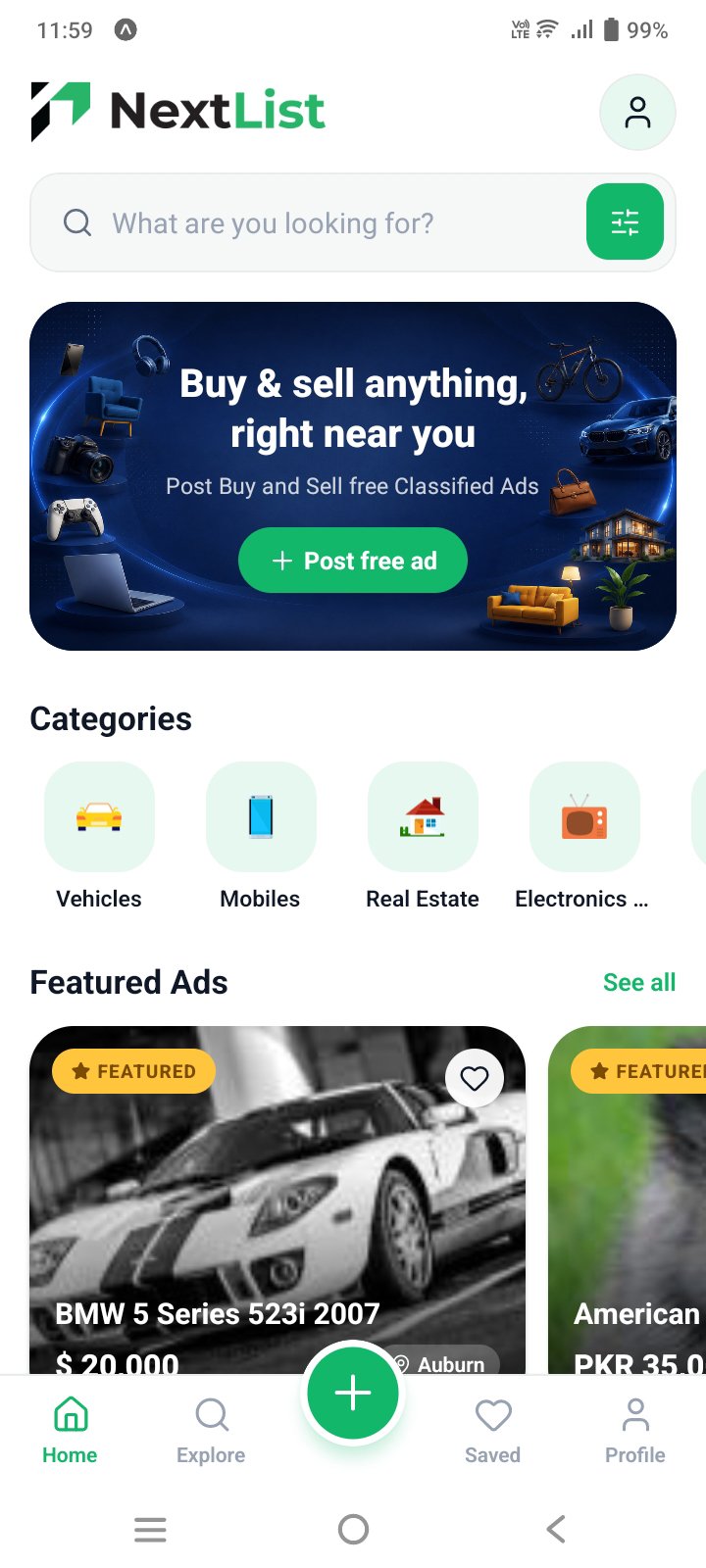
NextList app home screen
๐Ÿ”” Push Notifications
โš ๏ธ Important before you buy

What you need to run NextList

NextList is the mobile app. It works together with the Post and Buy Laravel backend, which is sold separately.

Step 1 · This item

NextList Mobile App

The Android & iOS app your users download from the stores.

  • React Native + Expo source code (TypeScript)
  • Android & iOS builds with EAS
  • Push notifications, payments & AI screens
  • Documentation and demo APK
Try the demo app
Required
Step 2 · Separate purchase

Post and Buy Laravel Backend

The website, admin panel and API that power the app.

  • Website, admin panel and REST API
  • Manage categories, packages, payments & currency
  • AI and push notification settings
  • Not included in this item
Get the Laravel backend →
Post and Buy Classified Ads Marketplace, Laravel version. You need the Laravel version for this app.

The app will not work without the backend installed on your own HTTPS server.

Key Features

Everything you need to launch a complete classified ads marketplace

  • ๐Ÿ”
    Search & FiltersKeyword, category, price, city and category-specific filters
  • โญ
    Featured AdsHighlighted listings on the home screen and in search
  • โค๏ธ
    Saved AdsSave favourites and view them anytime
  • ๐Ÿ“ž
    Contact SellersCall the seller, send a message or report an ad
๐Ÿ”

Find anything, fast

Search and filter thousands of listings, save favourites and contact sellers in one tap.

CategoriesPrice rangeCity / areaSorting
  • ๐Ÿ“
    Post & Edit AdsDynamic category fields, price, currency and location
  • ๐Ÿ“Š
    Seller DashboardActive, inactive, under review, rejected and saved ads with views
  • ๐Ÿ“ฆ
    Posting PackagesFree and paid plans with ad limits and featured days
  • ๐Ÿ”
    Secure AccountsRegister, email OTP verification and OTP password reset
๐Ÿ“ข

Post an ad in minutes

Add photos, pick a category and go live. Manage everything from your own dashboard.

Up to 8 photosEdit anytimeActivate / pauseRestore deleted
  • ๐Ÿ›ก๏ธ
    AI Ad ReviewYour AI model approves or rejects new ads. Unsure ads wait in an admin review queue
  • ๐Ÿท๏ธ
    Clear Ad StatusUnder review and rejected badges, rejection reasons and Edit & resubmit
  • ๐Ÿ’ฌ
    AI Help AssistantIn-app chat for logged-in users, answering from your FAQs and explaining their own ads and plan
  • ๐Ÿ”‘
    Bring Your Own AIOpenAI-compatible, Claude or Gemini with your own API key, set up in the admin panel
๐Ÿค–

Smart moderation, built in

Keep spam and scams out without reviewing every ad yourself. Off by default and controlled from the admin panel, so you decide how much to automate.

OpenAIClaudeGeminiGroqOllamaPush results
  • ๐Ÿ’ณ
    Multiple GatewaysStripe, PayPal, Razorpay, SSLCOMMERZ and Bank Transfer
  • ๐Ÿงพ
    Payment HistoryTrack every order and manage saved cards
  • ๐Ÿฆ
    Bank Receipt UploadUsers upload a receipt and the admin confirms the plan
  • โœ…
    Success ScreensClear confirmation after payment, posting, sign-up and reset
๐Ÿ’ณ

Get paid your way

Enable the gateways you want from the admin panel and the app shows only those.

StripePayPalRazorpaySSLCOMMERZBank transfer
  • ๐Ÿ””
    Push NotificationsPlan activated, ad approved or rejected and featured alerts, tap to open
  • ๐Ÿ”—
    Laravel API ReadyControlled from the Post and Buy admin panel, no rebuild needed. Requires the Post and Buy Laravel backend (separate purchase).
  • โšก
    Fast & OptimizedExpo, TypeScript and React Query for smooth performance
  • ๐Ÿ“š
    Full DocumentationStep-by-step setup, payments, AI, push and store submission
๐Ÿš€

Built to launch

React Native + Expo + TypeScript, connected to a Laravel API and ready for the stores.

AndroidiOSLaravel APIEAS Build

Third-Party Services & Costs

NextList's AI features connect to services you sign up for yourself. Here's exactly what that means before you buy.

๐Ÿค– AI Ad Review & Help Assistant

These two features send requests to a third-party AI provider — OpenAI, Anthropic (Claude) or Google Gemini, or any OpenAI-compatible service such as Groq, OpenRouter or Ollama.

You connect your own account and API key for that provider in the admin panel. The provider bills you directly for usage, based on their own pricing. This is not a fee charged by us, and no API key or AI credit is included with this item.

Both features are optional and switched off by default.

Pay-per-useYour own API keyOff by default

๐Ÿ”” Push Notifications

Push notifications run on the Expo Push Service together with Firebase Cloud Messaging (Android) and Apple Push Notification service (iOS) — all free to use.

You still need your own free Firebase project and, for iOS, an Apple Developer account ($99/year) to publish the app.

No per-message costFree Firebase project required

๐Ÿ’ณ Payment Gateways

Stripe, PayPal, Razorpay and SSLCOMMERZ each charge their own transaction and currency-conversion fees on payments made through your marketplace.

These fees are billed by the gateway to your merchant account and are not included in the price of this item.

Per-transaction feesBilled to your merchant account
โš ๏ธ In short: this item is source code and a one-time license. Any usage of OpenAI / Anthropic / Google Gemini, Stripe / PayPal / Razorpay / SSLCOMMERZ, Firebase, or Apple / Google developer accounts is a separate account you create and pay for directly with that company — independent of anything you pay us for NextList.

Try the Android Demo

Install the demo app on your Android phone and test every feature before you buy.

๐Ÿค– Android ๐Ÿ“ฆ Version 1.1.0 ๐Ÿ’พ ~91 MB
๐Ÿ“ฅ Download Demo APK

On a computer? Scan with your phone camera to download.

How to install

  1. Tap Download Demo APK (or scan the QR code) on your Android phone.
  2. Open the downloaded file from your notifications or the Downloads folder.
  3. If asked, allow Install unknown apps for your browser, then tap Install.
  4. Open NextList and log in with the demo account above.

The demo is connected to our shared test server. Please don't enter real personal or payment details.

The app needs the Post and Buy Laravel backend, which is a separate purchase.